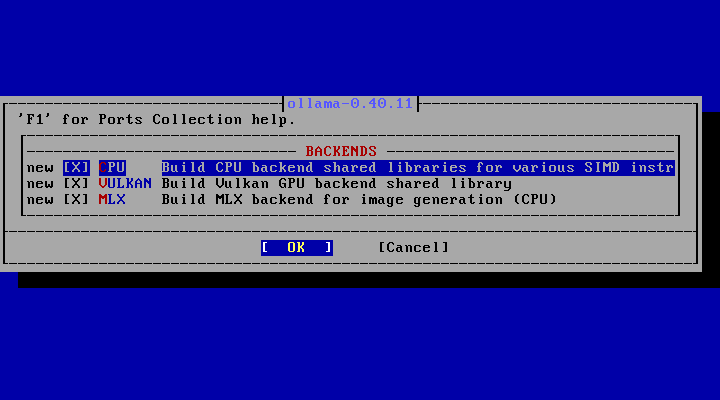
make NO_DIALOG=yes


 と、これが、下記で止まります。


===>  License MIT accepted by the user
===>   ollama-0.40.11 depends on file: /usr/local/sbin/pkg - found
===>   ollama-0.40.11 depends on file: /usr/local/bin/go127 - found
=> llama-b11738-ui.tar.gz doesn't seem to exist in /usr/ports/distfiles/go/misc_ollama/ollama-v0.40.11.
=> Attempting to fetch https://github.com/ggml-org/llama.cpp/archive/refs/tags/llama-b11738-ui.tar.gz
fetch: https://github.com/ggml-org/llama.cpp/archive/refs/tags/llama-b11738-ui.tar.gz: Not Found
=> Attempting to fetch https://github.com/ggml-org/llama.cpp/releases/download/b11845/llama-b11738-ui.tar.gz
fetch: https://github.com/ggml-org/llama.cpp/releases/download/b11845/llama-b11738-ui.tar.gz: Not Found
=> Attempting to fetch http://distcache.FreeBSD.org/ports-distfiles/go/misc_ollama/ollama-v0.40.11/llama-b11738-ui.tar.gz
fetch: http://distcache.FreeBSD.org/ports-distfiles/go/misc_ollama/ollama-v0.40.11/llama-b11738-ui.tar.gz: Not Found
=> Couldn't fetch it - please try to retrieve this
=> port manually into /usr/ports/distfiles/go/misc_ollama/ollama-v0.40.11 and try again.
*** Error code 1

Stop.
make[1]: stopped making "/usr/ports/misc/ollama/work/.stage_done.ollama._usr_local" in /usr/ports/misc/ollama
*** Error code 1

Stop.
make: stopped making "all" in /usr/ports/misc/ollama


 仕方ない。
 「pkg」でインストールすることにします。
 「pkg」をアップデートしたうえで。


pkg install ollama


Updating FreeBSD-ports repository catalogue...
FreeBSD-ports repository is up to date.
Updating FreeBSD-ports-kmods repository catalogue...
FreeBSD-ports-kmods repository is up to date.
All repositories are up to date.
The following 2 package(s) will be affected (of 0 checked):

New packages to be INSTALLED:
        ollama: 0.34.3_2 [FreeBSD-ports]
        spirv-llvm-translator-llvm19: 19.1.22 [FreeBSD-ports]

Number of packages to be installed: 2

The process will require 139 MiB more space.
27 MiB to be downloaded.

Proceed with this action? [y/N]:


 「llvm」は、「llvm23」が最新のはずなのに「llvm19」に依存するものが多いようです。
 y Enter で進めます。
 インストール時のメッセージを掲載しておきます。


Message from ollama-0.34.3_2:

--
You installed ollama: the AI model runner.

To run ollama, plese open 2 terminals.
1. In the first terminal, please run:
   $ ollama serve
2. In the second terminal, please run:
   $ ollama run gemma3
   or
   $ ollama run mistral

This will download and run the specified AI model.
You will be able to interact with it in plain English.

Please see https://ollama.com/library for the list
of all supported models.

The command "ollama list" lists all models downloaded
into your system.

When the model fails to load into your GPU, please use
the provided ollama-limit-gpu-layers script to create
model flavors with different num_gpu parameters.

ollama uses many gigabytes of disk space in your home directory,
because advanced AI models are often very large.
Please symlink ~/.ollama to a large disk if needed.

Working examples:
(1) Coding with the model gpt-oss:20b:
  1. start ollama service with 'sudo service ollama start'
     or
     setup and start the service 'ollama'
  2. install claude-code and run:
     ANTHROPIC_BASE_URL=http://localhost:11434 \
     ANTHROPIC_AUTH_TOKEN=ollama \
     ANTHROPIC_MODEL=gpt-oss:20b \
     ANTHROPIC_DEFAULT_SONNET_MODEL=gpt-oss:20b \
     ANTHROPIC_DEFAULT_OPUS_MODEL=gpt-oss:20b \
     ANTHROPIC_DEFAULT_HAIKU_MODEL=gpt-oss:20b \
     claude
  3. Ask it to write some program.

(2) Image generation with the model x/z-image-turbo:
  1. start ollama service with 'sudo service ollama start'
     or
     setup and start the service 'ollama'
  2. run:
     ollama run x/z-image-turbo {textual description of the desired image}

Please note that the x/z-image-turbo model requires a minimum of 64GB of
RAM to run or a similar amount of VRAM on a Vulkan device.

There are also a lot of text-to-text models that you can chat with.

You might also want to install the 'gollama' package. gollama allows to
run ollama models very easily.


3. 起動

 「ollama」は、サービスとして起動します。
 が、環境がデフォルトのままでは、動かないようで、必要な環境を設定してから起動します。
 「root」ユーザ権限で。
 作業ディレクトリの作成とパーミッション設定。


mkdir -pv /var/db/ollama


chown nobody:nobody /var/db/ollama


 起動スクリプトに上記を設定。


vi /usr/local/etc/rc.d/ollama


: ${ollama_use_vulkan:="1"}

run_command="/usr/local/bin/ollama"


 38~39行の間に下記を行を追加します。


ollama_env="${ollama_env:-HOME=/var/db/ollama}"


 いよいよ、起動です。


sysrc ollama_enable="YES"


service ollama start


service ollama status


 これで、下記が出力されれば、起動成功です。


ollama is running as pid nnnnn.


4. 参考サイト

 本ページは、「Gemini」伍長を参考にさせていただきました。