- 1. 概要
- 2. postfix
- 3. dovecot
1. 概要

 以下、必要な「ports」をインストールしていきます。
 「smtp」「smtps」を扱うサーバプログラムとして「postfix」、「pop」「pop3」「imap」「imaps」を扱うサーバプログラムとして「dovecot」をインストールします。
 すべて、「root」ユーザ権限で。

2. postfix


cd /usr/ports/mail/postfix


make config


 下記が、デフォルトのオプションになります。
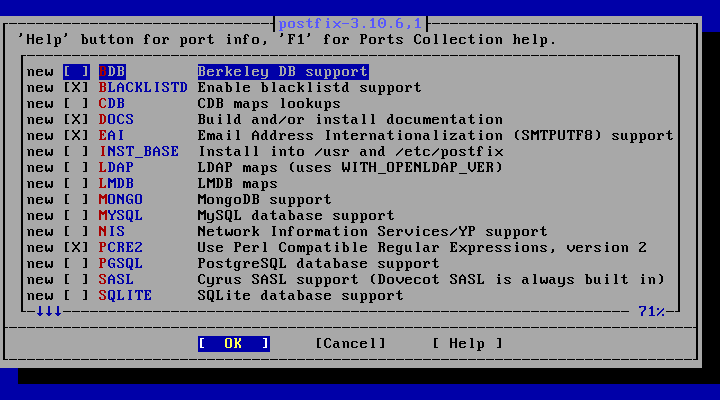
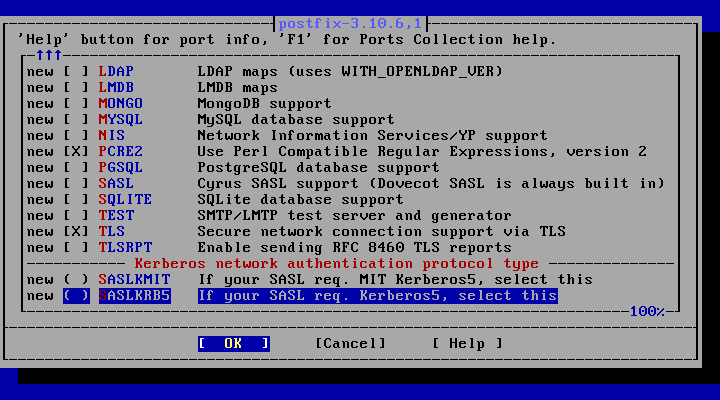
 ようわからんのですが、もしかしたら使うかもしれないので、「MYSQL」「PGSQL」のチェックは、いれておきます。
 「BLACKLISTD」のチェックは、はずしておきます。
 そうしておかないと、メールのログに下記のようなメッセージが出て、や、なのです。


Jul  8 15:02:57 nt postfix/smtpd[75909]: bl_init: connect failed for `/var/run/blacklistd.sock' (No such file or directory)


 後で、変えるかもしれません。


make NO_DIALOG=yes


make install


 インストール時に下記のメッセージが表示されました。


===>  Installing for postfix-3.10.6,1
===>  Checking if postfix is already installed
===>   Registering installation for postfix-3.10.6,1
Installing postfix-3.10.6,1...
===> Creating groups
Using existing group 'mail'
Creating group 'maildrop' with gid '126'
Creating group 'postfix' with gid '125'
===> Creating users
Creating user 'postfix' with uid '125'
===> Creating homedir(s)
Adding user 'postfix' to group 'mail'

===============================================================
Postfix was *not* activated in //usr/local/etc/mail/mailer.conf!

To finish installation run the following commands:

  mkdir -p //usr/local/etc/mail
  install -m 0644 //usr/local/share/postfix/mailer.conf.postfix //usr/local/etc/mail/mailer.conf
===============================================================

To use postfix instead of sendmail:
  - clear sendmail queue and stop the sendmail daemons

Run the following commands to enable postfix during startup:
  - sysrc postfix_enable="YES"
  - sysrc sendmail_enable="NONE"

If postfix is *not* already activated in /usr/local/etc/mail/mailer.conf
  - mv /usr/local/etc/mail/mailer.conf /usr/local/etc/mail/mailer.conf.old
  - install -d /usr/local/etc/mail
  - install -m 0644 /usr/local/share/postfix/mailer.conf.postfix /usr/local/etc/mail/mailer.conf

Disable sendmail(8) specific tasks,
add the following lines to /etc/periodic.conf(.local):
  daily_clean_hoststat_enable="NO"
  daily_status_mail_rejects_enable="NO"
  daily_status_include_submit_mailq="NO"
  daily_submit_queuerun="NO"

If you are using SASL, you need to make sure that postfix has access to read
the sasldb file.  This is accomplished by adding postfix to group mail and
making the /usr/local/etc/sasldb* file(s) readable by group mail (this should
be the default for new installs).

===> SECURITY REPORT:
      This port has installed the following binaries which execute with
      increased privileges.
/usr/local/sbin/postlog

      If there are vulnerabilities in these programs there may be a security
      risk to the system. FreeBSD makes no guarantee about the security of
      ports included in the Ports Collection. Please type 'make deinstall'
      to deinstall the port if this is a concern.

      For more information, and contact details about the security
      status of this software, see the following webpage:
https://www.postfix.org/


 インストール時点で、下記のフォルダ、ファイルが作成されています。


/usr/local/etc/postfix/
|-- access
|-- access.sample
|-- aliases
|-- aliases.sample
|-- bounce.cf.default
|-- canonical
|-- canonical.sample
|-- generic
|-- generic.sample
|-- header_checks
|-- header_checks.sample
|-- LICENSE
|-- main.cf
|-- main.cf.default
|-- main.cf.sample
|-- master.cf
|-- master.cf.sample
|-- relocated
|-- relocated.sample
|-- TLS_LICENSE
|-- transport
|-- transport.sample
|-- virtual
`-- virtual.sample


3. dovecot


cd /usr/ports/mail/dovecot


make config


 下記が、デフォルトのオプションになります。
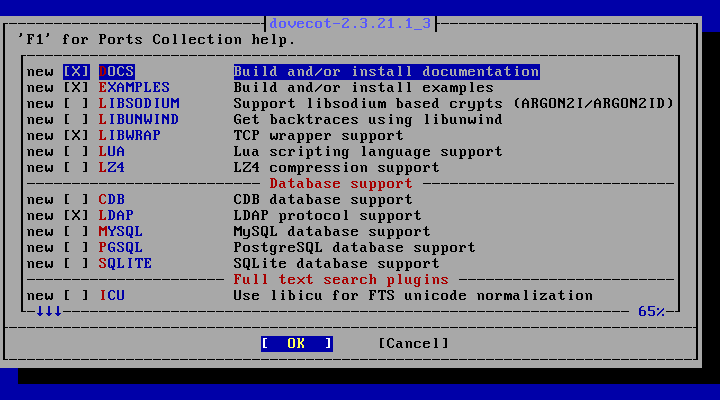
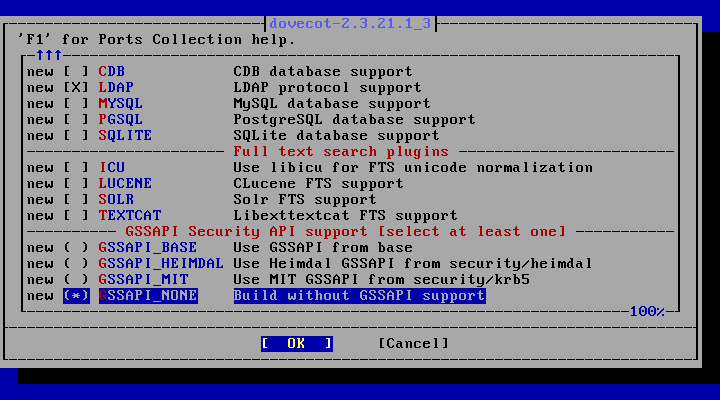
 これも、「MYSQL」「PGSQL」のチェックは、いれておきます。


make NO_DIALOG=yes


make install


 インストール時に下記のメッセージが表示されました。


===>  Installing for dovecot-2.3.21.1_3
===>  Checking if dovecot is already installed
===>   Registering installation for dovecot-2.3.21.1_3
Installing dovecot-2.3.21.1_3...
===> Creating groups
Creating group 'dovecot' with gid '143'
Creating group 'dovenull' with gid '144'
===> Creating users
Creating user 'dovecot' with uid '143'
Creating user 'dovenull' with uid '144'
 You must create the configuration files yourself. Copy them over
 to /usr/local/etc/dovecot and edit them as desired:

        cp -R /usr/local/etc/dovecot/example-config/* \
                /usr/local/etc/dovecot

 The default configuration includes IMAP and POP3 services, will
 authenticate users agains the system's passwd file, and will use
 the default /var/mail/$USER mbox files.

 Next, enable dovecot in /etc/rc.conf:

        dovecot_enable="YES"


 To avoid a risk of mailbox corruption, do not set the
 security.bsd.see_other_uids or .see_other_gids sysctls to 0
 if Dovecot is storing mail for multiple concurrent users (PR 218392).

 Similarly, setting sysctls security.bsd.hardlink_check_uid or
 security.bsd.hardlink_check_gid to 1 might result in non-working
 mailboxes, depending on what mailbox locking mechanism is used
 (PR 242223).

 If you want to be able to search within attachments using the
 decode2text plugin, you'll need to install textproc/catdoc, and
 one of graphics/xpdf or graphics/poppler-utils.


 There are some potentially breaking changes in Dovecot 2.3. If you
 are upgrading from Dovecot 2.2:

   * https://doc.dovecot.org/2.3/installation_guide/upgrading/from-2.2-to-2.3/
   * Merge the configuration file changes from
     /usr/local/etc/dovecot/examples-config/


 インストール時点で、下記のフォルダ、ファイルが作成されています。


/usr/local/etc/dovecot/
|-- example-config
|   |-- conf.d
|   |   |-- 10-auth.conf
|   |   |-- 10-director.conf
|   |   |-- 10-logging.conf
|   |   |-- 10-mail.conf
|   |   |-- 10-master.conf
|   |   |-- 10-metrics.conf
|   |   |-- 10-ssl.conf
|   |   |-- 15-lda.conf
|   |   |-- 15-mailboxes.conf
|   |   |-- 20-imap.conf
|   |   |-- 20-lmtp.conf
|   |   |-- 20-pop3.conf
|   |   |-- 20-submission.conf
|   |   |-- 90-acl.conf
|   |   |-- 90-plugin.conf
|   |   |-- 90-quota.conf
|   |   |-- auth-checkpassword.conf.ext
|   |   |-- auth-deny.conf.ext
|   |   |-- auth-dict.conf.ext
|   |   |-- auth-ldap.conf.ext
|   |   |-- auth-master.conf.ext
|   |   |-- auth-passwdfile.conf.ext
|   |   |-- auth-sql.conf.ext
|   |   |-- auth-static.conf.ext
|   |   `-- auth-system.conf.ext
|   |-- dovecot-dict-auth.conf.ext
|   |-- dovecot-dict-sql.conf.ext
|   |-- dovecot-ldap.conf.ext
|   |-- dovecot-oauth2.conf.ext
|   |-- dovecot-sql.conf.ext
|   `-- dovecot.conf
`-- README
|























































