ここまでの時点で、システムインストールと「VirtualBox Guest Additions」の設定は終わっているものとします。
 ぞれぞれのインストール・設定に関しては

	「FreeBSD - デスクトップ環境構築 - 共通事項 - システムインストール」
	「FreeBSD - デスクトップ環境構築 - 共通事項 - VirtualBox Guest Additions」

 をご参照ください。

2. インストール


pkg install -y xorg numlockx ja-font-migmix


pkg install -y sddm sddm-freebsd-black-theme cursor-neutral-white-theme


pkg install -y openbox openbox-arc-theme


 最下行の、「Openbox」のインストールは、一瞬で終わります。
 バージョンの推移です。

	・2020年 6月26日	「FreeBSD 11.4 RELEASE」	「3.6_6」
	・2020年11月 9日	「FreeBSD 12.2 RELEASE」	「3.6_6」
	・2021年 6月 8日	「FreeBSD 13.0 RELEASE」	「3.6_7」
	・2022年 1月13日	「FreeBSD 12.3 RELEASE」	「3.6_7」
	・2022年 6月 3日	「FreeBSD 13.1 RELEASE」	「3.6_9」
	・2023年 1月12日	「FreeBSD 12.4 RELEASE」	「3.6_9」
	・2023年 5月20日	「FreeBSD 13.2 RELEASE」	「3.6_9」
	・2024年 1月30日	「FreeBSD 14.0 RELEASE」	「3.6_9」
	・2024年 3月26日	「FreeBSD 13.3 RELEASE」	「3.6_9」
	・2024年 6月17日	「FreeBSD 14.1 RELEASE」	「3.6_11」
	・2024年10月18日	「FreeBSD 13.4 RELEASE」	「3.6_12」
	・2024年12月18日	「FreeBSD 14.2 RELEASE」	「3.6_12」
	・2025年 4月11日	「FreeBSD 13.5 RELEASE」	「3.6_12」
	・2025年 6月25日	「FreeBSD 14.3 RELEASE」	「3.6_13」
	・2025年12月22日	「FreeBSD 15.0 RELEASE」	「3.6_14」
	・2026年 4月 6日	「FreeBSD 14.4 RELEASE」	「3.6_14」

 2026年6月24日の時点で「Openbox」のバージョンは、下記の通りでした。


pkg info openbox


openbox-3.6_14
Name           : openbox
Version        : 3.6_14
Installed on   : Wed Jun 24 09:15:56 2026 JST
Origin         : x11-wm/openbox
Architecture   : FreeBSD:15:amd64
Prefix         : /usr/local
Categories     : x11-wm
Licenses       : GPLv2
Maintainer     : novel@FreeBSD.org
WWW            : http://openbox.org/
Comment        : Small, fast, standards compliant, extensible window manager
Options        :
        IMLIB          : on
        NLS            : on
        NOTIFY         : on
        PATCHES        : off
        SVG            : on
Shared Libs required:
        libICE.so.6
        libImlib2.so.1
        libSM.so.6
        libX11.so.6
        libXau.so.6
        libXcursor.so.1
        libXext.so.6
        libXft.so.2
        libXinerama.so.1
        libXrandr.so.2
        libXrender.so.1
        libc.so.7
        libcairo.so.2
        libfontconfig.so.1
        libfreetype.so.6
        libgdk_pixbuf-2.0.so.0
        libgio-2.0.so.0
        libglib-2.0.so.0
        libgobject-2.0.so.0
        libharfbuzz.so.0
        libintl.so.8
        libpango-1.0.so.0
        libpangoft2-1.0.so.0
        libpangoxft-1.0.so.0
        librsvg-2.so.2
        libstartup-notification-1.so.0
        libxml2.so.16
Shared Libs provided:
        libobrender.so.29
        libobt.so.2
Annotations    :
        FreeBSD_version: 1500068
        build_timestamp: 2026-06-20T02:57:26+0000
        built_by       : poudriere-git-3.4.8
        port_checkout_unclean: no
        port_git_hash  : 78db3aeaafd6e8351d3fa52693f922e0020da12f
        ports_top_checkout_unclean: no
        ports_top_git_hash: 2d63ddc3a88abe02ecd65ae2269cc889eaa7ee5e
        repo_type      : binary
        repository     : FreeBSD-ports
Flat size      : 1.47MiB
Description    :
Openbox is a highly configurable, next generation window manager with
extensive standards support.

Openbox lets you bring the latest applications outside of a full desktop
environment.  Most modern applications have been written with GNOME and KDE
in mind.  With support for the latest freedesktop.org standards, as well as
careful adherence to previous standards, Openbox provides an environment
where applications work the way they were designed to.

Openbox is a highly configurable window manager.  It allows you to change
almost every aspect of how you interact with your desktop and invent
completely new ways to use and control it.  It can be like a video game for
controlling windows.  But Openbox can also be kept extremely simple, as it is
in the default setup, meaning that it can suit just about anybody.  Openbox
gives you control without making you do everything.

Openbox makes desktop environments better.  By running Openbox inside the
GNOME or K desktop environments, you can combine their ease and
functionality with the power of Openbox.  Your desktop becomes cleaner and
faster, and is in your control, when you use Openbox.

This port also includes optional 3rd party patches for rounder corners
support and miscellaneous fixes from
https://github.com/dylanaraps/openbox-patched.


3. SDDM カスタマイズ

 「sddm」のカスタマイズ方法については、「デスクトップ環境構築 - 共通事項 - ログインマネージャ - SDDM」をご参照ください。

4. 初期化ファイル作成

 ログインユーザで。


mkdir -pv ~/.config
cp -R /usr/local/etc/xdg/openbox ~/.config/.
chmod +w  ~/.config/openbox/*

cat << 'EOF' >> ~/.config/openbox/autostart
/usr/local/bin/VBoxClient-all
setxkbmap -layout jp
numlockx on
EOF


 「root」ユーザ権限で。


cat << 'EOF' >> /etc/profile
export LC_ALL="ja_JP.UTF-8"
export LANGUAGE="ja_JP.UTF-8"
export LANG="ja_JP.UTF-8"
EOF

cat << 'EOF' >> /etc/csh.cshrc
setenv LC_ALL   "ja_JP.UTF-8"
setenv LANGUAGE "ja_JP.UTF-8"
setenv LANG     "ja_JP.UTF-8"
EOF


5. ログインマネージャ起動

 前項までインストール・設定したものを有効にして、起動します。
 「root」ユーザ権限で。
 有効化。


sysrc polkitd_enable=YES
sysrc dbus_enable=YES
sysrc sddm_enable=YES


 起動。


service dbus start
service sddm start


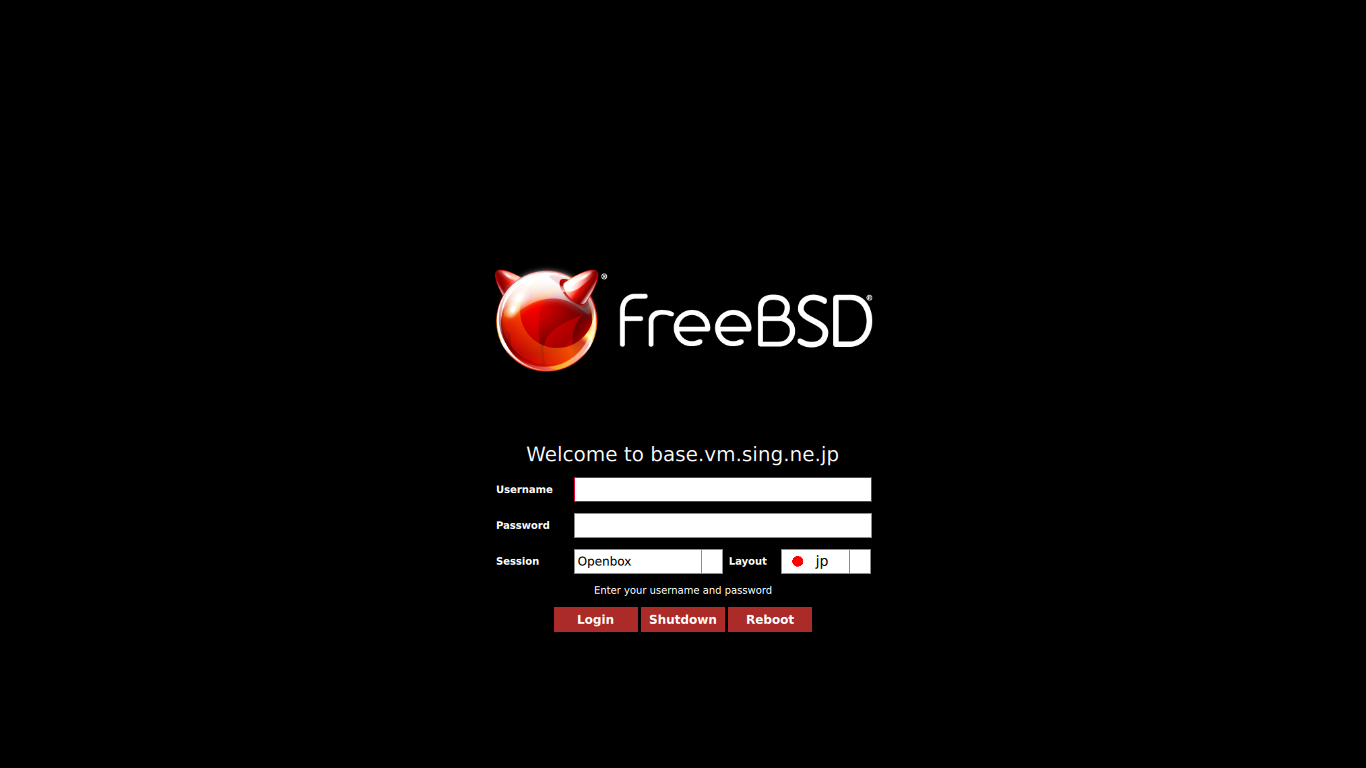
 うまく設定できていれば、ログイン画面が表示されます。
 ユーザ名・パスワードを入力してログインします。