- 1. 概要
- 2. インストール
- 3. SDDM カスタマイズ
- 4. シャットダウンユーザ設定
- 5. ユーザ用初期化ファイルの作成
- 6. ログインマネージャ起動
1. 概要

 下記のデスクトップ環境を構築する手順を記述します。
| 種 別 | リソース・設定 | 備考 |
|---|
| ホスト | Windows11 25H2 | |
| 仮想環境 | VirtualBox 7.2.16 | |
| ゲスト | FreeBSD 14.5 RELEASE | |
| ログインマネージャ | SDDM | |
| 仮想OS | BSD | |
| 仮想OSディストリビューション | FreeBSD | |
| 仮想OSバージョン | FreeBSD (64bit) | |
| ハードディスク | 180 GB | |
| メモリ | 4 GB | |
| CPU | 2コア | |
| グラフィックスコントローラ | VBoxSVGA 128MB 3D Disable | |
 ここまでの時点で、システムインストールと「VirtualBox Guest Additions」の設定は終わっているものとします。
 ぞれぞれのインストール・設定に関しては、

	「FreeBSD - デスクトップ環境構築 - 共通事項 - システムインストール」
	「FreeBSD - デスクトップ環境構築 - 共通事項 - VirtualBox Guest Additions」

 をご参照ください。

2. インストール

 「root」ユーザで


pkg install -y xorg ja-font-migmix numlockx


pkg install -y sddm sddm-freebsd-black-theme cursor-neutral-white-theme


pkg install -y lumina


 バージョンの推移です。

	・2023年 4月17日	「FreeBSD 13.2 RELEASE」	「lumina-1.6.2,3」
	・2024年 1月12日	「FreeBSD 14.0 RELEASE」	「lumina-1.6.2_1,3」
	・2024年 3月18日	「FreeBSD 13.3 RELEASE」	「lumina-1.6.2_1,3」
	・2024年 6月12日	「FreeBSD 14.1 RELEASE」	「lumina-1.6.2_1,3」
	・2024年10月 8日	「FreeBSD 13.4 RELEASE」	「lumina-1.6.2_1,3」
	・2025年12月11日	「FreeBSD 14.2 RELEASE」	「lumina-1.6.2_1,3」
	・2025年 4月 8日	「FreeBSD 13.5 RELEASE」	「lumina-1.6.2_1,3」
	・2025年 6月23日	「FreeBSD 14.3 RELEASE」	「lumina-1.6.2_1,3」
	・2025年12月18日	「FreeBSD 15.0 RELEASE」	「lumina-1.6.2_1,3」
	・2026年 4月 2日	「FreeBSD 14.4 RELEASE」	「lumina-1.6.2_1,3」
	・2026年 6月23日	「FreeBSD 15.1 RELEASE」	「lumina-1.6.2_1,3」

 2026年9月17日の時点でのバージョンは、下記のとおりです。


pkg info lumina


lumina-1.6.2_1,3
Name           : lumina
Version        : 1.6.2_1,3
Installed on   : Thu Sep 17 08:56:36 2026 JST
Origin         : x11/lumina
Architecture   : FreeBSD:14:*
Prefix         : /usr/local
Categories     : x11
Licenses       : NA
Maintainer     : jwb@FreeBSD.org
WWW            : https://github.com/lumina-desktop/lumina
Comment        : Lumina Desktop Environment (meta-port)
Annotations    :
        build_timestamp: 2026-09-15T07:00:30+0000
        built_by       : poudriere-git-3.4.8-3-gd92fb7c0
        port_checkout_unclean: no
        port_git_hash  : e9e40e40c5d926e4d17c156665b69e8073cc863b
        ports_top_checkout_unclean: no
        ports_top_git_hash: 73dd2e4cf114247f57748fff5c438928bfc06d27
        repo_type      : binary
        repository     : FreeBSD
Flat size      : 243B
Description    :
The Lumina Desktop Environment is a lightweight system interface that is
designed for use on any Unix-like operating system. It takes a
plugin-based approach, allowing the entire interface to be assembled or
arranged by each individual user as desired, with a system-wide default
layout which can be customized by the system administrator. This allows
every system (or user session) to be designed to maximize the individual
user's productivity.

This meta-package installs all the packages related to the Lumina desktop.
If you want more fine-grained control over the installed utilities, please
install the individual x11/lumina-* and deskutils/lumina-* packages instead.


3. SDDM カスタマイズ

 「sddm」のカスタマイズ方法については、「デスクトップ環境構築 - 共通事項 - ログインマネージャ - SDDM」をご参照ください。

4. シャットダウンユーザの設定

 一般ユーザからもシャットダウンできるようにします。
 逆に、一般ユーザからシャットダウンさせないようにするにはこの手順を行わないでください。
 「Lumina」の設定は、以前やっていたものと同様の方法でいけます。
 (というか、他のデスクトップのやり方では、設定できません)

 以下、「root」ユーザ権限で。
 「polkit」の設定。


cat << 'EOF' >> /usr/local/etc/polkit-1/localauthority/50-local.d/org.freedesktop.consolekit.pkla
[Local restart]
Idendity=unix-group:power
Action=org.freedesktop.consolekit.system.restart
ResultAny=yes
ResultInactive=yes
ResultActive=yes

[Local shutdown]
Idendity=unix-group:power
Action=org.freedesktop.consolekit.system.stop
ResultAny=yes
ResultInactive=yes
ResultActive=yes

[Local restart - multiple]
Idendity=unix-group:power
Action=org.freedesktop.consolekit.system.restart-multiple-users
ResultAny=yes
ResultInactive=yes
ResultActive=yes

[Local shutdown - multiple]
Idendity=unix-group:power
Action=org.freedesktop.consolekit.system.stop-multiple-users
ResultAny=yes
ResultInactive=yes
ResultActive=yes

[Suspend Hibernate]
Idendity=unix-group:power
Action=org.freedesktop.upower.*
ResultAny=yes
ResultInactive=yes
ResultActive=yes
EOF


 電源操作グループ作成


pw groupadd power


 「/etc/group」編集


vi /etc/group


power:*:1002:wheel,operator,power	←	1002 はタイミングによって変わります。: 以降を追加しています。


 「operator」に「Lumina」でログインするユーザのグループを追加します。


operator:*:5:root	←	スペースを空けず、カンマで区切って権限を与えるユーザのグループを追加


5. ユーザ用初期化ファイルの作成

 「root」ユーザ権限で。
 日本語環境を設定します。


cat << 'EOF' >> /etc/profile
export LC_ALL="ja_JP.UTF-8"
export LANGUAGE="ja_JP.UTF-8"
export LANG="ja_JP.UTF-8"
EOF

cat << 'EOF' >> /etc/csh.cshrc
setenv LC_ALL   "ja_JP.UTF-8"
setenv LANGUAGE "ja_JP.UTF-8"
setenv LANG     "ja_JP.UTF-8"
EOF


 キーボードレイアウトを設定して、Num Lock を有効にします。


cat - << EOF >> /usr/share/skel/dot.xsession
#!/bin/sh
#
setxkbmap -layout jp
numlockx &
EOF

chmod +x /usr/share/skel/dot.xsession


 既存のログインユーザで


cp /usr/share/skel/dot.xsession ~/.xsession


6. ログインマネージャ起動

 前項までインストール・設定したものを有効にします。
 「root」ユーザ権限で。


sysrc polkitd_enable=YES
sysrc dbus_enable=YES
sysrc sddm_enable=YES


 起動。


service dbus start
service sddm start


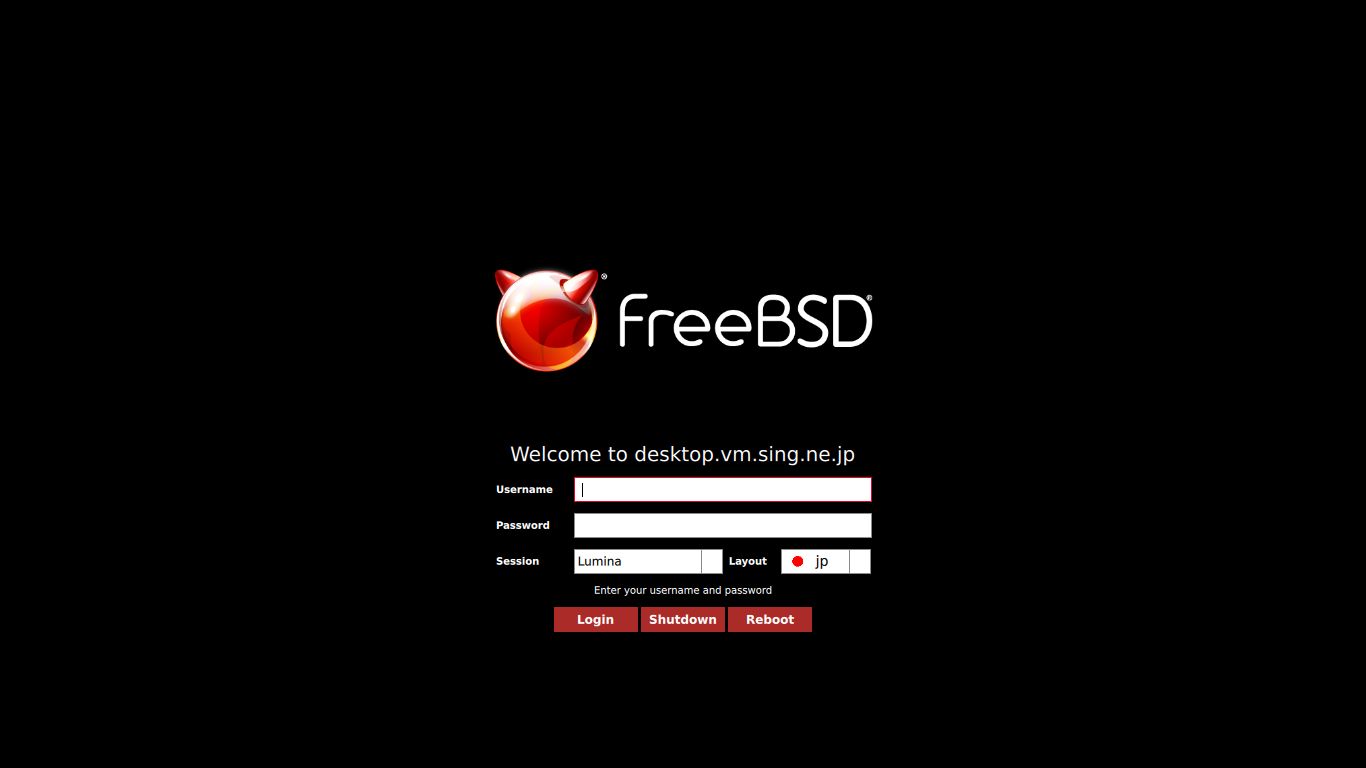
 うまく設定できていれば、ログイン画面が表示されます。
 ユーザ名・パスワードを入力してログインします。
|