- 1. 概要
- 2. 状況
- 3. 調査
- 4. 対策
- 5. 付随するもの
- 6. 参考サイト
1. 概要

 2026年7月1日、実際は、もう少し前から発生しておりますが。
 「FreeBSD 15.1 RELEASE」での出来事です。

2. 状況


portversion -v | grep '<'


[Reading data from pkg(8) ... - 452 packages found - done]
ImageMagick7-7.1.2.24       <  needs updating (port has 7.1.2.25)
php84-pecl-imagick-3.8.0_1  <  needs updating (port has 3.8.0_2)
py311-myst-parser-5.1.0     <  needs updating (port has 5.1.0_1)
py311-snowballstemmer-3.0.1  <  needs updating (port has 3.1.0)
py311-sphinx-5.3.0_3,1      <  needs updating (port has 9.0.4,1)


 てなことになっております。
 「py311-*」以外のものは、「py311-*」に依存して問題が発生し、アップグレードできない状況になっています。

3. 調査

 「Gemini」伍長に、訪ねてみたところ。


FreeBSD の Ports コレクションにおいて、デフォルトの Python バージョンが Python 3.11 から 3.12 へ移行したこと が原因で発生している競合エラーです。

py312-sphinx のビルド中に依存関係として py312-build がインストールされようとしていますが、すでにシステムにある py311-build と実行ファイル(/usr/local/bin/pyproject-build)が衝突してしまい、インストールが中断されています。

この問題を解決するには、既存の Python 3.11 系のビルドツールを削除するか、強制的に上書き(入れ替え)を行う必要があります。


 てことだそうであります。

4. 対策

 ということで、「python 3.11」を「3.12」へアップグレードします。


pkg set -o lang/python311:lang/python312


 下記を訊いてきますので。


Change origin from lang/python311 to lang/python312 for python311-3.11.15_4? [y/N]:


 y Enter で応えます。


env BATCH=yes portupgrade -f python311 -o lang/python312


 これが、エラーになるので。


5 problem(s) in 1 package(s) found.
=> Please update your ports tree and try again.
=> Note: Vulnerable ports are marked as such even if there is no update available.
=> If you wish to ignore this vulnerability rebuild with 'make DISABLE_VULNERABILITIES=yes'
*** Error code 1

Stop.
make: stopped making "all" in /usr/ports/lang/python312
egrep: empty (sub)expression
** Command failed [exit code 1]: /usr/bin/script -qa /tmp/portupgrade20260701-20529-2jauyf env UPGRADE_TOOL=portupgrade UPGRADE_PORT=python311-3.11.15_4 UPGRADE_PORT_VER=3.11.15_4 make
** Fix the problem and try again.
** Listing the failed packages (-:ignored / *:skipped / !:failed)
        ! lang/python312 (python311-3.11.15_4)  (security vulnerabilities)


cd /usr/ports/lang/python311


make deinstall clean


cd /usr/ports/lang/python312


make config
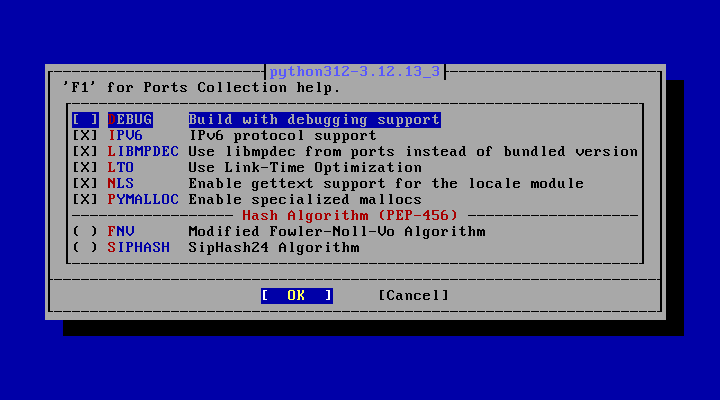
make NO_DIALOG=yes DISABLE_VULNERABILITIES=yes


make reinstall


 これで、「python」本体は、「python3.11」から「python3.12」へアップグレードされます。
 シンボリックリンクは、はりなおします。
 「root」ユーザ権限で。


rm -f /usr/local/bin/python
ln -s /usr/local/bin/python3.12 /usr/local/bin/python


 確認。


python --version


Python 3.12.13


 「python」のバージョンを定義しておきます。


vi /etc/make.conf


DEFAULT_VERSIONS+=python=3.11 python3=3.11


 があれば、削除して代わりに、なければ、新規で、下記を記述します。


DEFAULT_VERSIONS+=python=3.12 python3=3.12


5. 付随するもの

 「python」に付随するものが、やまほどあります。


portversion -v | grep 'py311'


[Reading data from pkg(8) ... - 451 packages found - done]
py311-Babel-2.18.0          =  up-to-date with port
py311-CommonMark-0.9.1_2    =  up-to-date with port
py311-Jinja2-3.1.6          =  up-to-date with port

・・・	略	・・・

py311-urllib3-2.7.0,1       =  up-to-date with port
py311-wheel-0.47.0          =  up-to-date with port
py311-wheel044-0.44.0_1     =  up-to-date with port


 インストールしているアプリケーションにもよりますが、100前後はあるはずです。
 まず、どうしてもうまくいかないものがあるので、さきにアップグレードします。
 削除から。


pkg delete py311-build py311-setuptools


Updating database digests format: 100%
Checking integrity... done (0 conflicting)
Deinstallation has been requested for the following 4 packages (of 0 packages in the universe):

Installed packages to be REMOVED:
        py311-build: 1.5.0
        py311-hatch-vcs: 0.5.0
        py311-setuptools: 63.1.0_3
        py311-setuptools-scm: 9.2.2

Number of packages to be removed: 4

The operation will free 12 MiB.

Proceed with deinstalling packages? [y/N]:


 y Enter で答えます。


[1/4] Deinstalling py311-build-1.5.0...
[1/4] Deleting files for py311-build-1.5.0: 100%
[2/4] Deinstalling py311-hatch-vcs-0.5.0...
[2/4] Deleting files for py311-hatch-vcs-0.5.0: 100%
[3/4] Deinstalling py311-setuptools-scm-9.2.2...
[3/4] Deleting files for py311-setuptools-scm-9.2.2: 100%
[4/4] Deinstalling py311-setuptools-63.1.0_3...
[4/4] Deleting files for py311-setuptools-63.1.0_3: 100%


 もうひとつ。


pkg delete py311-wheel


 これも上記の手順で削除します。
 インストール。


cd /usr/ports/devel/py-build


 オプションは、ありません。


make NO_DIALOG=yes DISABLE_VULNERABILITIES=yes


make reinstall


 次に、シェルスクリプトを作成します。


mkdir -pv ~/sh


vi ~/sh/pyupdate.sh


 下記を記述します。


#!/bin/sh

# インストールされている py311- から始まるパッケージ名の一覧を確実に取得
for pkg_name in $(pkg query "%n" | grep '^py311-'); do

    # 現在のOriginを取得 (例: textproc/py-sphinx)
    origin=$(pkg query "%o" "$pkg_name")

    # 移行先のOriginを py312 に書き換え (例: textproc/py-sphinx)
    # ※フレーバー(@py311)がついている場合も考慮して置換
    new_origin=$(echo "$origin" | sed -E 's/(py|python)311/\1312/')

    # 新しいパッケージ名 (例: py312-sphinx)
    new_pkg_name=$(echo "$pkg_name" | sed 's/py311-/py312-/')

    echo "========================================="
    echo "Processing: $pkg_name -> $new_pkg_name"
    echo "Origin change: $origin -> $new_origin"
    echo "========================================="

    # 1. pkgの登録情報を py312 に変更
    sudo pkg set -y -o "${origin}:${new_origin}"

    # 2. そのパッケージを portupgrade で即座に強制上書きアップグレード
    sudo env BATCH=yes portupgrade -f -o "$new_origin" -k "$pkg_name"
done


 書き終えたら。


chmod +x ~/sh/pyupdate.sh


 して。


~/sh/pyupdate.sh


 これで、多くのパッケージが、自動で「py311」から「py312」にアップグレードされます。


=========================================
Processing: py311-sphinxcontrib-devhelp -> py312-sphinxcontrib-devhelp
Origin change: textproc/py-sphinxcontrib-devhelp -> textproc/py-sphinxcontrib-devhelp
=========================================


 シェル実行後、「py311」で残っているものを確認します。


portversion -v | grep 'py311'


[Reading data from pkg(8) ... - 446 packages found - done]
py311-CommonMark-0.9.1_2    =  up-to-date with port
py311-boost-libs-1.89.0     =  up-to-date with port
py311-gi-docgen-2026.1      =  up-to-date with port
py311-hatchling-1.29.0      =  up-to-date with port
py311-meson-python-0.18.0,1  =  up-to-date with port
py311-myst-parser-5.1.0     <  needs updating (port has 5.1.0_1)
py311-numpy-2.4.6_1,1       =  up-to-date with port
py311-pygments-2.20.0       =  up-to-date with port
py311-recommonmark-0.5.0_3  =  up-to-date with port
py311-requests-2.34.2       =  up-to-date with port
py311-sphinx-5.3.0_3,1      <  needs updating (port has 9.0.4,1)
py311-typogrify-2.1.0       =  up-to-date with port
py311-urllib3-2.7.0,1       =  up-to-date with port


 ぐっと減ったので、これらは手動でアップグレードしてもなんとかなるかと思います。
 下記を繰り返して、アップグレードしていきます。


pkg delete package_name


cd /usr/ports/path/package_name


make NO_DIALOG=yes


make reinstall


6. 参考サイト

 本ページは、「Gemini」伍長を参考にさせていただきました。
|